# Misc

# Welcome to Impressto Docs

This site contains comprehensive resources for small business owners seeking to resolve common digital challenges efficiently and effectively. This site is designed to provide expert solutions without the need for extensive overhauls.

Whether you are facing unexpected bugs, performance issues, outdated servers, or non-functional features, this site will try to offer the guidance and support you need to keep your digital assets running smoothly.

##### Featured Articles:

[Create your own cloud storage with syncthing](https://docs.impressto.ca/books/devops/page/create-your-own-cloud-storage-with-syncthing "https://docs.impressto.ca/books/devops/page/create-your-own-cloud-storage-with-syncthing")

[Off-grid System Monitoring IOT Project](https://docs.impressto.ca/books/off-grid-system-monitoring-iot-project "Off-grid System Monitoring IOT Project")

[Making 3d printing a little easier](https://docs.impressto.ca/books/3d-printing/page/making-3d-printing-a-little-easier)

# Record perfect audio from Youtube or others

Recently Youtube and other major media outlets have made is amlost impossible to download or capture audio. No worry, there is an easy workaround using Audacity and Pulse audio.

Here are the steps:

<span class="T286Pc" data-processed="true" data-sfc-cb="" data-sfc-cp="">**Install Necessary Tools:**  
If not already installed, open your terminal and run:  
`sudo apt-get install audacity pavucontrol`</span>

<span class="T286Pc" data-processed="true" data-sfc-cb="" data-sfc-cp="">Mute your microphone in system settings</span>

<span class="T286Pc" data-processed="true" data-sfc-cb="" data-sfc-cp="">Open the video you want to record and start playing it</span>

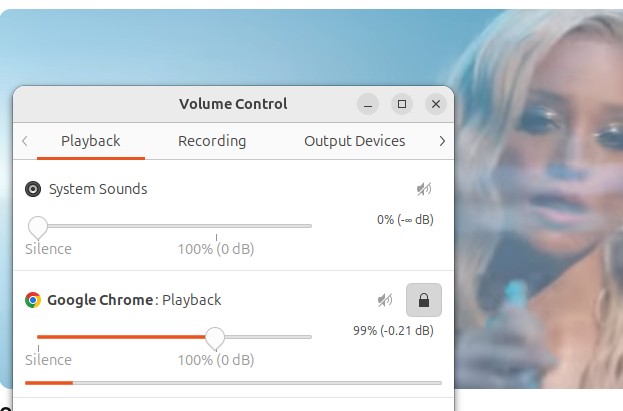
Open <span class="T286Pc" data-processed="true" data-sfc-cb="" data-sfc-cp="">**PulseAudio Volume Control**<span class="Yjhzub"> and in the playback tab you should see the audio being monitored.</span></span>

<span class="T286Pc" data-processed="true" data-sfc-cb="" data-sfc-cp="">[![pulseaudio.jpg](https://docs.impressto.ca/uploads/images/gallery/2026-03/scaled-1680-/vYwpulseaudio.jpg)](https://docs.impressto.ca/uploads/images/gallery/2026-03/vYwpulseaudio.jpg)</span>

<span class="T286Pc" data-processed="true" data-sfc-cb="" data-sfc-cp="">**Configure Audacity:**</span>

<span class="T286Pc" data-processed="true" data-sfc-cb="" data-sfc-cp="">Open Audacity.</span>

<span class="T286Pc" data-processed="true" data-sfc-cb="" data-sfc-cp="">In the audio setup toolbar (or preferences), set the Host to **ALSA**.</span>

<span class="T286Pc" data-processed="true" data-sfc-cb="" data-sfc-cp="">Set the Recording Device to **pulse** or **default**.</span>

<span class="T286Pc" data-processed="true" data-sfc-cb="" data-sfc-cp="">**Configure PulseAudio Volume Control:**</span>

<span class="T286Pc" data-processed="true" data-sfc-cb="" data-sfc-cp="">Open **PulseAudio Volume Control** (pavucontrol) from your application menu.</span>

<span class="T286Pc" data-processed="true" data-sfc-cb="" data-sfc-cp="">Start recording in Audacity (click the red record button).</span>

<span class="T286Pc" data-processed="true" data-sfc-cb="" data-sfc-cp="">Quickly go to the **Recording** tab in pavucontrol.</span>

<span class="T286Pc" data-processed="true" data-sfc-cb="" data-sfc-cp="">Find Audacity in the list and change its input from the microphone to **"Monitor of..."** (e.g., *Monitor of Built-in Audio Analog Stereo*).</span>

<span class="T286Pc" data-processed="true" data-sfc-cb="" data-sfc-cp="">**Record:**</span>

<span class="T286Pc" data-processed="true" data-sfc-cb="" data-sfc-cp="">Play the video you want to record. Audacity will now capture the output sound instead of the microphone input.</span><span class="uJ19be notranslate" data-processed="true" data-sfc-cb="" data-wiz-uids="q5qttc_29,q5qttc_2a"><span class="vKEkVd" data-animation-atomic="" data-processed="true" data-wiz-attrbind="class=q5qttc_28/TKHnVd"><span aria-hidden="true" data-processed="true"> </span><button aria-label="Ask Ubuntu (+4) - View related links" class="rBl3me IWyTpf pjvauc" data-amic="true" data-hveid="CAQQDA" data-icl-uuid="42d30904-684d-4963-a705-675e4d24847b" data-processed="true" data-ved="2ahUKEwiT_r7Q0p-TAxVeIzQIHVAgL9YQye0OegQIBBAM" data-wiz-attrbind="disabled=q5qttc_28/C5gNJc;aria-label=q5qttc_28/bOjMyf;class=q5qttc_28/UpSNec" tabindex="0"></button></span></span>

<div class="Fwa2Od" data-animation-skip="" data-processed="true" data-sfc-cb="" data-ved="2ahUKEwiT_r7Q0p-TAxVeIzQIHVAgL9YQ3s0SegQIBBAN" id="bkmrk--1" jsaction="" jscontroller="Pwlgo" jsuid="q5qttc_2b">  
</div>